Playground
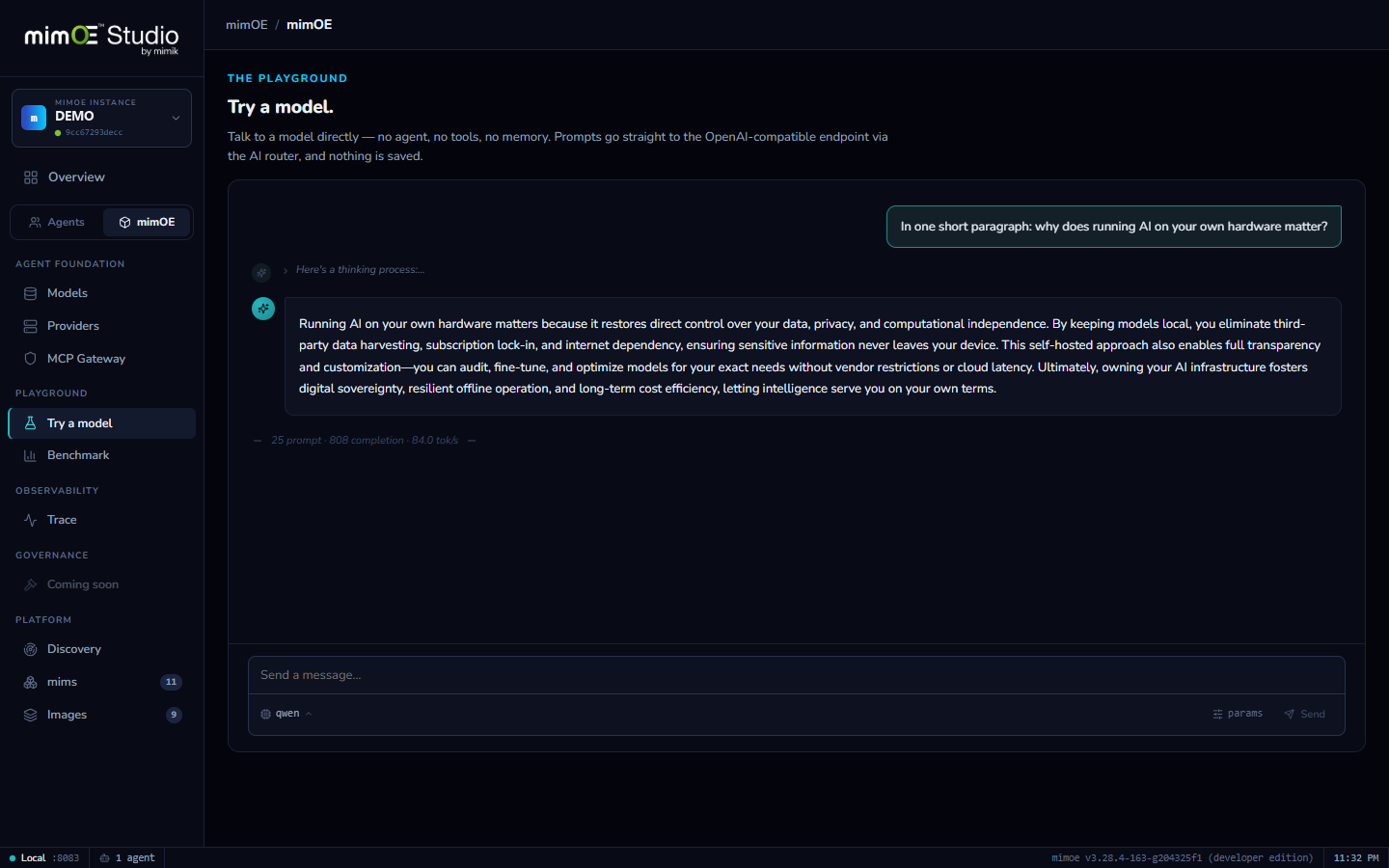
A raw line to any model. No agent in between.
Windows only for now.
The model, unfiltered
Agent chat adds tools, skills, and a system prompt. The Playground removes all of it. What you see is the model itself, which is exactly what you want when deciding if a model is good enough.
One click from anywhere
Every model row has a Try button, whether it's local, an alias, or a nearby model on another machine. It lands you in the Playground with that model already selected.
Tune in place
System prompt, temperature, and max tokens sit in a small popover. Tweak and re-ask without leaving the conversation.
Nothing saved
Playground conversations are throwaway by design. Sessions, history, and persistence belong to agents; this is scratch paper.
How it works
- 1
Hit Try on any model
Every model row, whether local, alias, attached, or nearby on the mesh, has a Try button that lands you in the Playground with that model selected.
- 2
Ask, and watch it work
The response streams in live; on thinking models, the reasoning streams separately from the answer, so you see the path as well as the destination.
- 3
Read the numbers
Every turn shows its tokens-per-second, measured on your hardware, in your setup. Comparing two models is as simple as asking both the same question.
- 4
Tune and re-ask
System prompt, temperature, and max tokens live in a small popover. Tweak, re-ask, iterate. When you close it, nothing is kept.